OAuth for Client Developers
If you build a tool that needs a Lumen API key on behalf of a user, don't ask them to paste a key — run one of Lumen's two key-request flows. Both end the same way: the user sees what is being requested, signs in, approves, and your app receives a brand-new Lumen API key that you then use as a Bearer token (see Connect Your Tools).
Lumen mints every key itself; the plaintext is returned exactly once and Lumen keeps only a hash. client_id is currently a free-form label ([A-Za-z0-9._-]{1,128}) — there is no client registry yet, so the consent page shows your label under an Unverified application banner.
Device flow (CLIs and terminal tools)
Best for anything without a browser callback. Follows the shape of RFC 8628 with small differences noted below.
- Request a code (form-encoded, rate limited 500/min per IP):
POST /oauth/device_authorization
client_id=my-cli&name=my-cli-key&author=alice
| Field | Meaning |
|---|---|
client_id |
Your application label (required) |
name |
Name the user's new key will get (required) |
author |
Optional free-form label shown to the approver (e.g. the OS user running the CLI) |
The JSON response contains device_code, user_code (XXXX-XXXX), verification_uri, verification_uri_complete, expires_in (600 s) and interval (5 s). Show the code and open verification_uri_complete; all secrets stay in POST bodies — only the short user code ever appears in a URL.
- Poll for the key every
intervalseconds:
POST /oauth/token
grant_type=urn:ietf:params:oauth:grant-type:device_code&device_code=…&client_id=…
While the user hasn't decided you get 400 {"error": "authorization_pending"}. Handle:
| Error | Meaning / what to do |
|---|---|
authorization_pending |
Keep polling |
slow_down |
Poll interval must grow by 5 s |
expired_token |
Request older than 10 min — start over |
access_denied |
User clicked Deny — fail cleanly |
invalid_grant |
Unknown device_code / client_id mismatch, or a retry after claim |
On approval you get 200 {"access_token": "sk_…", "token_type": "Bearer", "approved_by": "alice@example.edu"} — store the key immediately; it is never returned again. approved_by tells you whose account approved, which is worth printing. Responses carry Cache-Control: no-store, and /oauth/token answers OPTIONS preflights with Access-Control-Allow-Origin: * so browser-based tools can poll it too. The /v1 API allows cross-origin requests as well, so a browser app can use the key it gets here directly (see CORS).
Once approved, the request stays claimable for 60 s (the claim window) so a CLI that lost a network round trip can still pick the key up; an abandoned approval simply expires and creates nothing.
- If the user already has a key with the same
name, the approval page requires them to tick an overwrite checkbox, and the old key is only deactivated when yours is minted. If the name is taken between approval and your poll, the claim fails withinvalid_grant(key name now in use) and the approval stays open for a minute so they can retry after renaming.
Authorization-code flow with PKCE (web apps)
For apps that can receive a browser redirect. Public clients only: no client_secret exists yet, so PKCE is mandatory.
- Send the user to:
GET /oauth/authorize?response_type=code
    &client_id=my-app&name=my-app-key&author=alice
    &redirect_uri=https://portal.example.org/cb
    &state=<random>&code_challenge=<S256>&code_challenge_method=S256
redirect_uri must be absolute https (or http to a localhost port for development) with no fragment or credentials. Validation failures render an error page and never redirect, since the destination is unverified at that point.
-
The user signs in (you get bounced through login and back), sees the consent page — destination origin shown prominently, models with per-model consent, overwrite checkbox when relevant — and approves or denies.
-
Approve →
302toredirect_uri?code=<auth_code>&state=<state> - Deny →
302toredirect_uri?error=access_denied&state=<state> -
Redeem → POST
/oauth/token(see step 3 below) -
Redeem within 60 seconds, once:
POST /oauth/token
grant_type=authorization_code&code=…&client_id=…&redirect_uri=…&code_verifier=…
redirect_uri must match the approved value exactly and the verifier must hash (S256) to the original challenge. Success returns the same JSON shape as the device flow. Replaying a used code returns invalid_grant and revokes the key that was minted, so a leaked code can't be traded for a live key — redeem promptly and store the token safely.
Minimal browser example
For a complete, commented example that keeps the key in localStorage, shows the key's usage and a models table, and splits the logic into a reusable ES module (lumen-oauth.js), see scripts/web-oauth in the repository.
Serve this from the page that hosts your callback (redirect_uri). Keep the server response for the callback route headers-only if you can; at minimum set Referrer-Policy: no-referrer so the code never leaks onward.
<!doctype html>
<meta charset="utf-8">
<meta name="referrer" content="no-referrer">
<title>Get a Lumen key</title>
<button id="start">Connect Lumen</button>
<pre id="out"></pre>
<script>
const LUMEN = "https://lumen.example.edu";
const CB = location.origin + location.pathname;
const enc = v => { const b = new Uint8Array(v); let s = ""; b.forEach(c => s += String.fromCharCode(c));
  return btoa(s).replace(/\+/g, "-").replace(/\//g, "_").replace(/=+$/, ""); };

async function start() {
  const verifier = enc(crypto.getRandomValues(new Uint8Array(48)));
  const challenge = enc(await crypto.subtle.digest("SHA-256", new TextEncoder().encode(verifier)));
  const state = enc(crypto.getRandomValues(new Uint8Array(16)));
  sessionStorage.setItem("oauth", JSON.stringify({ verifier, state }));
  const q = new URLSearchParams({ response_type: "code", client_id: "my-web-app",
    name: "my-web-app-key", redirect_uri: CB, state, code_challenge: challenge,
    code_challenge_method: "S256" });
  location = LUMEN + "/oauth/authorize?" + q;
}

async function callback() {
  const saved = JSON.parse(sessionStorage.getItem("oauth") || "null");
  sessionStorage.removeItem("oauth");
  const p = new URLSearchParams(location.search);
  history.replaceState(null, "", location.pathname);   // strip code/state from the URL
  if (!saved || p.get("state") !== saved.state) return out("state mismatch — possible CSRF");
  if (p.get("error")) return out("denied: " + p.get("error"));
  const r = await fetch(LUMEN + "/oauth/token", { method: "POST", body: new URLSearchParams({
    grant_type: "authorization_code", code: p.get("code"), client_id: "my-web-app",
    redirect_uri: CB, code_verifier: saved.verifier }) });
  const j = await r.json();
  out(r.ok ? "key: " + j.access_token : "error: " + j.error);
}

const out = m => document.getElementById("out").textContent = m;
location.search ? callback() : document.getElementById("start").onclick = start;
</script>
The example is deliberately naive about key custody: a page whose only job is to obtain a key should show it once for copying and keep nothing. If your app holds the key in browser state, remember any script running on your origin can read it too.
Consent-page behavior
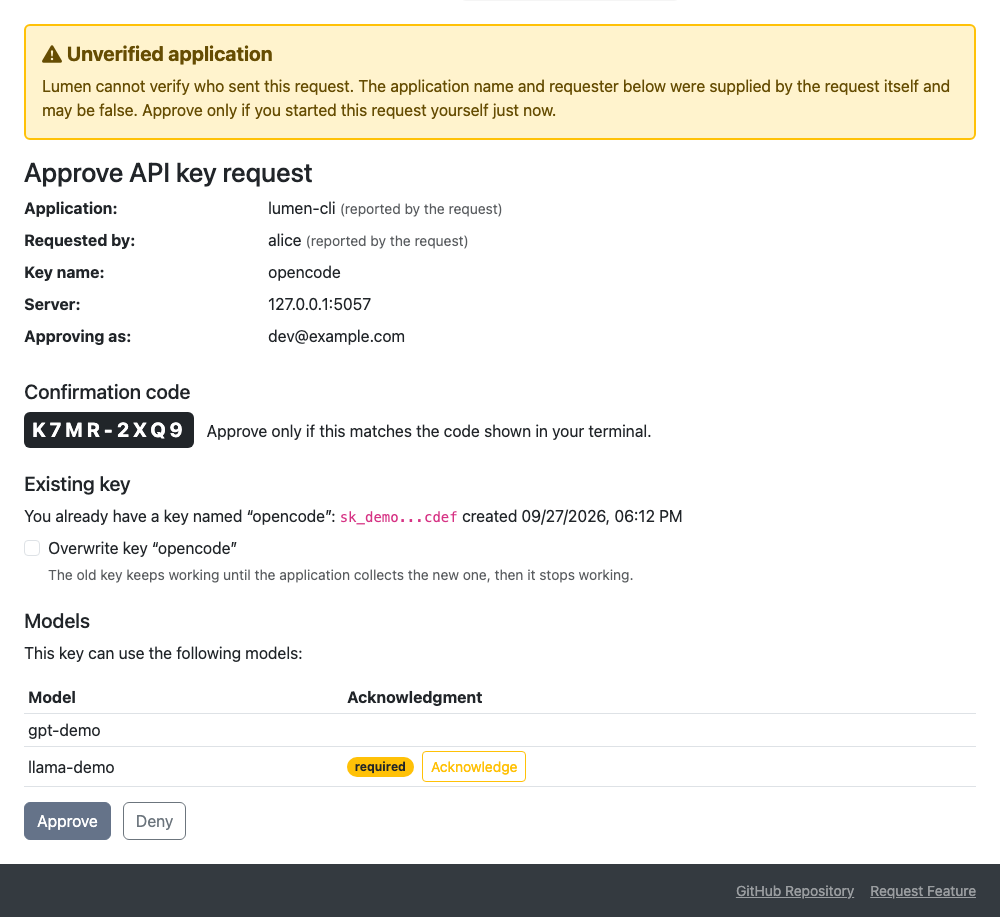
- Users must be signed in; you never see or handle credentials.
- Every unverified
client_idis shown under an Unverified application warning banner. - The model list is a table with an Acknowledgment column, matching the Models page: required pills with an Acknowledge button for models needing consent (the same dialog as the profile page, recorded immediately when confirmed, independent of the approve button), acknowledged pills with the acceptance date, and early access pills.
- Approving does not change any existing keys unless the user ticked overwrite for a same-name key; the page then shows the old key's hint so users recognize what they're replacing.
- Keys created through these flows record their
client_id(andauthor) as provenance, visible on the user's Profile key list tooltip, so users can see which tool asked for each key and revoke it there. A revoked key is deactivated and its usage kept; it stays listed under Show revoked keys, with the revocation time and, when known, who revoked it in the badge tooltip. A key revoked automatically because its authorization code was replayed shows no name. Times for keys revoked before this was recorded are approximate.